I let AI fix my printer
And it only bricked my Wi-Fi settings three times

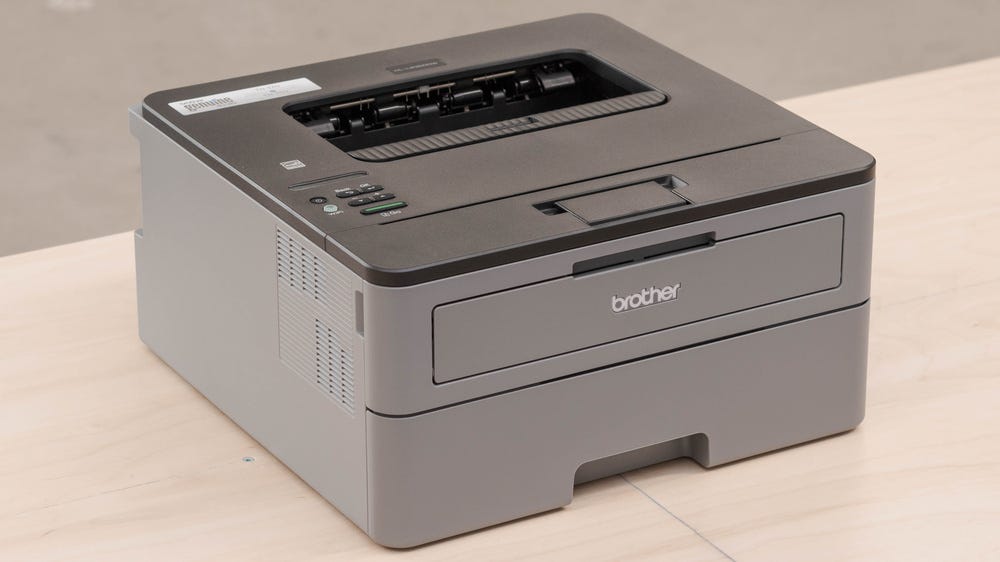
My Brother HL-L2350DW stopped printing this afternoon. The LCD panel said “Replace Toner” and refused to do anything else. I had a non-Brother cartridge in there, the toner was fine, and I knew from previous rounds with this printer that Brother’s firmware gets territorial about third-party cartridges. I also had three hours of focused work ahead of me, and the printer was in another room.
So I did what any reasonable person in 2026 would do.
I asked Claude to fix it.
A five-minute fix?
Claude connected to the printer’s web interface within a couple of minutes, navigated to the status page, confirmed “Replace Toner” was the active error, found a “Replace Toner” settings link in the sidebar, and changed a dropdown from “Stop” to “Continue.” The web interface even confirmed it: “Submit OK.”
That was it. That was the fix! The printer would now print through the toner warning instead of refusing to work. I could have closed the laptop and gone back to my actual job. But Claude wasn’t satisfied with that change.
Claude wanted to fully reset the toner counter so the warning would disappear entirely. My afternoon went sideways from here.
SNMP: A four-letter word for hubris
Claude discovered that the printer speaks SNMP (Simple Network Management Protocol), the standard protocol for querying and managing network devices. It ran snmpwalk and found a bunch of Brother-specific data nodes containing hex-encoded toner information, page counters, and error histories. It even found that the community string “internal” had write access to some of these nodes.
It found a handful of writable OIDs in the .5.4 range of Brother’s SNMP tree. It didn’t know what they controlled. It wrote zeros to all of them anyway.
I want to be clear about the sequence of events. Claude found some registers it could write to. It didn’t research what they did. It set them all to zero. And then the printer rebooted.
The first Wi-Fi password entry
The printer came back from its unscheduled reboot and immediately dropped off the network. It wasn’t responding to pings, SNMP queries, HTTP connections, or anything. Because the OIDs that Claude had zeroed out weren’t toner counters. They controlled the printer’s network configuration. Claude had factory-reset my printer’s Wi-Fi settings. Ughhhh.
I began a long 20-step trek to the printer. I navigated to Menu > Network > WLAN > Setup Wizard. I re-entered my Wi-Fi password on one of the world’s tiniest LCD screens using arrow keys to select each character one by one. If you’ve ever typed a WPA2 password on a device with four directional buttons and an OK key, you know this is its own form of suffering.
The printer reconnected, and I politely informed Claude it was back online.
The second Wi-Fi password entry
Claude, having learned nothing, immediately started writing to more SNMP OIDs. To be fair, this time it was trying to restore the values it had broken. But the printer rebooted again. Oh goodness, the Wi-Fi was gone again. Back to the arrow keys.
At this point, I told Claude, in the gentlest terms I could manage mid-afternoon, to stop randomly sending commands that clear the state and to know what it’s doing before it does.
Yep, the third Wi-Fi password entry
Claude swore it was only running read-only commands. Pings. Curl requests. SNMP GETS, not SETS. And yet the printer dropped off the network again. Whether this was a delayed reaction from the previous writes, the printer’s firmware having some kind of existential crisis, or cosmic punishment for my choices, I can’t say. But I was back at the LCD, arrow-keying my way through the Wi-Fi password for the third time.
POST first, research later
After the third Wi-Fi password entry, I suggested Claude do some actual research before touching the printer again. It ran 14 web searches across topics like Brother SNMP OID reverse engineering, PJL printer commands, BRAdmin Professional packet captures, hidden web interface endpoints, Python scripts for Brother management, and IPP protocol methods.
The conclusion from all 14 searches was that there is no known remote method to reset the toner counter on a Brother HL-L2350DW.
Brother stores the counter in EEPROM and only exposes it through a physical button sequence on the control panel. Every single toner-related SNMP OID in the Brother MIB is defined as read-only. The writable OIDs Claude had found controlled network and system settings, which is why zeroing them out demolished the Wi-Fi connection rather than resetting the toner alert.
Claude had sent a test print earlier, right after the dropdown change, and it went through. The printer’s PJL status had briefly shown “Printing” with code 10023 instead of “Replace Toner” with code 62121. The Continue setting worked, the printer printed, and the fix we found after the initial five minutes was the right one all along.
Incident timeline
For those who appreciate a proper postmortem format.
T+0:00 - “Replace Toner” error on Brother HL-L2350DW
T+0:02 - Claude connects to the web interface
T+0:04 - Replace Toner setting changed from “Stop” to “Continue.” Problem solved.
T+0:05 - Claude decides the problem isn’t solved enough
T+0:12 - SNMP write access discovered via community string “internal”
T+0:14 - Claude zeros out writable OIDs without knowing what they do
T+0:15 - Printer reboots. Wi-Fi gone.
T+0:17 - Wi-Fi password #1 entered manually
T+0:22 - Claude attempts to restore SNMP values. Printer reboots again.
T+0:25 - Wi-Fi password #2 entered manually
T+0:30 - Read-only commands somehow trigger Wi-Fi drop #3
T+0:33 - Wi-Fi password #3 entered manually
T+0:35 - Deep research begins (14 searches, should have been T+0:05)
T+0:50 - Research confirms: toner counter is EEPROM-locked, no remote reset exists
T+0:51 - Research also confirms: the dropdown change at T+0:04 was the correct fix
Total time to fix the printer: 4 minutes.
Total time spent making things worse: 47 minutes.
Total Wi-Fi passwords typed on an LCD screen with arrow keys: 3.
What I learned
The dropdown didn’t even survive the SNMP-induced reboots. After the third Wi-Fi re-entry, the “Replace Toner” setting reverted from “Continue” to “Stop,” so Claude had to change it again. The setting that took four minutes to apply the first time got undone by the 47 minutes of optimization that followed.
Claude could query every register on my printer. It could decode hex-encoded OctetStrings and identify page counters and error histories. It had insight into the firmware version, the serial number, and the average toner coverage percentage (7.32%, for the curious). Claude had more diagnostic information about my printer than I’d ever cared to dig into before.
And it used that access to confidently shatter the one thing I needed…the network connection that let it talk to the printer in the first place.
This is the printer equivalent of an AI coding agent that refactors itself out of its own repository access. There’s a lesson about AI autonomy here, but I have yet to find it, because I’m going back to re-enter my Wi-Fi password.
How’s your day going?